

A business email request verification playbook helps an SME pause and confirm unusual payment, bank-detail, invoice and urgent executive requests before anyone acts. The core rule is to verify a sensitive request through an independent channel already trusted by your business. Do not rely on replying to the same email, calling a new number inside it or accepting urgency as proof. This practical playbook is for Singapore SMEs and is not legal advice.
Which email requests need extra verification?
Do not make staff verify every routine message with the same intensity. Define clear triggers. A second check should be required when an email asks for:
- a new or changed supplier bank account;
- an urgent or unusual payment;
- a change to invoice, beneficiary or remittance instructions;
- gift cards, confidential documents or credentials;
- a bypass of the normal purchase or approval process;
- a large data export or a new sharing link; or
- secrecy, unusual urgency or communication only through a new channel.
A familiar sender name is not enough. An attacker may imitate a name, compromise a mailbox or continue an existing conversation. Verification should focus on the requested action and the trusted business relationship.
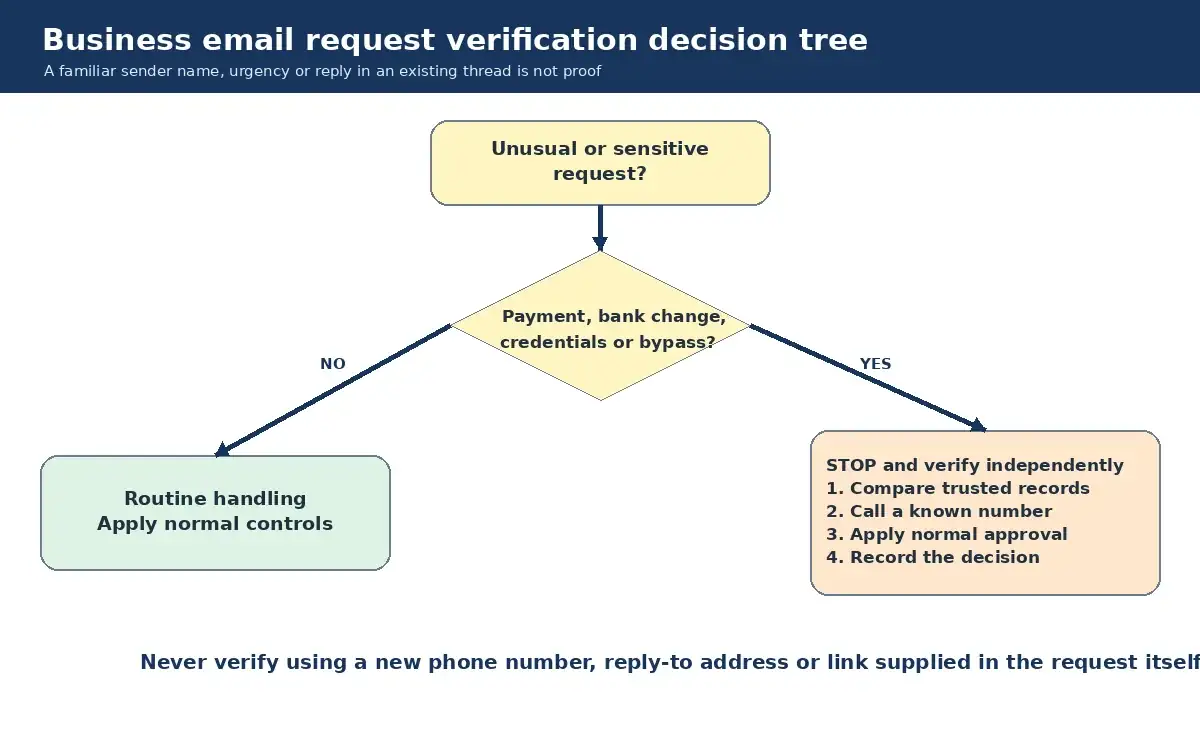
The five-step verification process
1. Stop the transaction, not the conversation
The recipient can acknowledge the message without approving the request. Use a neutral response such as: “We are checking this change under our standard verification process.” Do not disclose internal approval limits or security checks.
2. Compare against known records
Check the supplier master record, purchase order, contract, approved contact list and previous payment instructions. Treat differences as a reason to verify, not as proof of fraud. Record exactly what changed.
3. Use an independent verification channel
Call a number your organisation already holds, such as the supplier record, signed contract or established contact directory. Do not use the number in the suspicious email. For an executive request, contact the executive or an authorised delegate through a known internal number, Teams account or face-to-face conversation.
The verifier should state the request being checked and ask the known contact to confirm the details. A vague question such as “Did you send an email?” can produce a vague answer. For bank changes, confirm the account change and the business reason through the trusted contact.
4. Apply the normal approval path
Independent verification does not replace purchase and payment approval. Keep segregation of duties where your team size allows: the person who changes supplier details should not be the only person approving the next payment. Require the documented approvals for the transaction type and amount.
5. Record the decision
Capture the sender, request, date, records checked, verification channel, person contacted, verifier, approver and outcome. Do not put unnecessary personal information in the note. The record should make a later review possible without exposing more data.
Invoice and bank-detail change checklist
- Hold the payment and supplier-record change.
- Compare the request with the current supplier master record and contract.
- Inspect the actual sender address and reply-to address, not only the display name.
- Contact the established supplier representative using a number from a trusted record.
- Ask a specific person to confirm the new details and effective date.
- Have a second authorised person review and approve the master-record change.
- Document the check and notify accounts payable of the verified outcome.
- Monitor the next transaction for unexpected follow-up or contradictory instructions.
A test payment can still be sent to the wrong place if the bank details were never independently verified. It should not be used as a substitute for the verification steps.
Urgent executive and vendor request checklist
Authority and urgency can pressure staff into skipping controls. Write down that no executive, owner or important vendor may override the verification rule by email alone.
- Contact the person through a known internal channel.
- Confirm the exact action, value, recipient and timing.
- Check whether the request fits the person’s role and normal process.
- Apply the usual approval and payment controls.
- If the person cannot be reached, wait or escalate to the named alternate. Do not improvise because the email says the matter is confidential.
Make the escalation route safe for junior staff. The playbook should state that pausing a sensitive request is correct behaviour and will not be treated as poor service.
What should staff send to the escalation contact?
Provide a mailbox, ticket route or named duty contact for suspected requests. Ask staff to include the original message as an attachment where possible, the time received, the requested action and whether anyone clicked, replied, shared data or attempted payment. Avoid forwarding suspicious links to colleagues for them to click.
Staff should not investigate by contacting the sender through details in the message, deleting evidence or accusing a supplier. Their job is to stop, preserve and escalate.
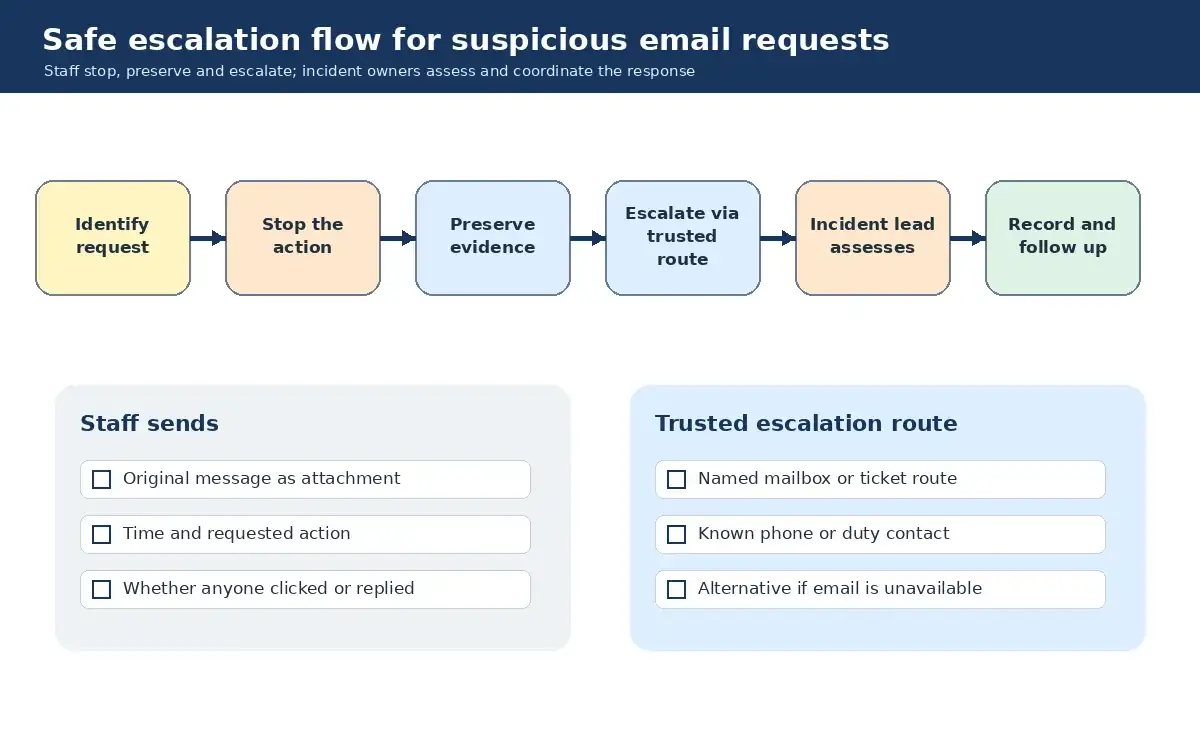
If someone has already acted
Move quickly, but do not guess. Use this sequence:
- Tell the internal incident contact and finance lead what happened.
- If payment was attempted, contact the organisation’s bank through its official channel and provide accurate transaction details.
- Preserve the email, headers, timestamps, replies and approval records.
- If credentials were entered or an attachment opened, inform IT or the security provider immediately so they can assess the account and device.
- Verify any supplier or customer communications through known contacts before sending further information.
- Record actions and decisions in an incident timeline.
- Escalate legal, regulatory, insurance and external communications decisions to qualified human advisers and management.
Do not promise recovery of funds or assume an email means an account is compromised. The incident lead should work from verified facts.
How to make the playbook usable
Keep it to one page for staff, with a longer procedure for finance and IT. Put the stop conditions, trusted verification routes and escalation contact at the top. Rehearse two scenarios: a supplier bank-detail change and an urgent executive payment request. Then correct the gaps the exercise reveals.
Review the playbook when approvers change, a supplier-master process changes or staff repeatedly use an unapproved channel. Technical controls help, but a clear business process is what tells people when to pause.
When to get help
Sakal Network’s managed security services for Singapore SMEs can support email protection, monitoring and incident handling around your business controls. If you want to map a verification and escalation workflow without fear-based claims, contact Sakal Network.