

Enquiry automation can reduce repetitive admin for Singapore service businesses, but it should not apply the same rule to every message. A low-risk acknowledgement based on an approved template may be sent automatically. Quotes, commitments, exceptions, payment disputes and unusual requests need explicit review according to the business’s policy.
This guide explains how to design an enquiry-to-confirmation workflow around risk, data quality and clear ownership rather than assuming that a particular step should always be automated.
Map the Enquiry-to-Confirmation Workflow
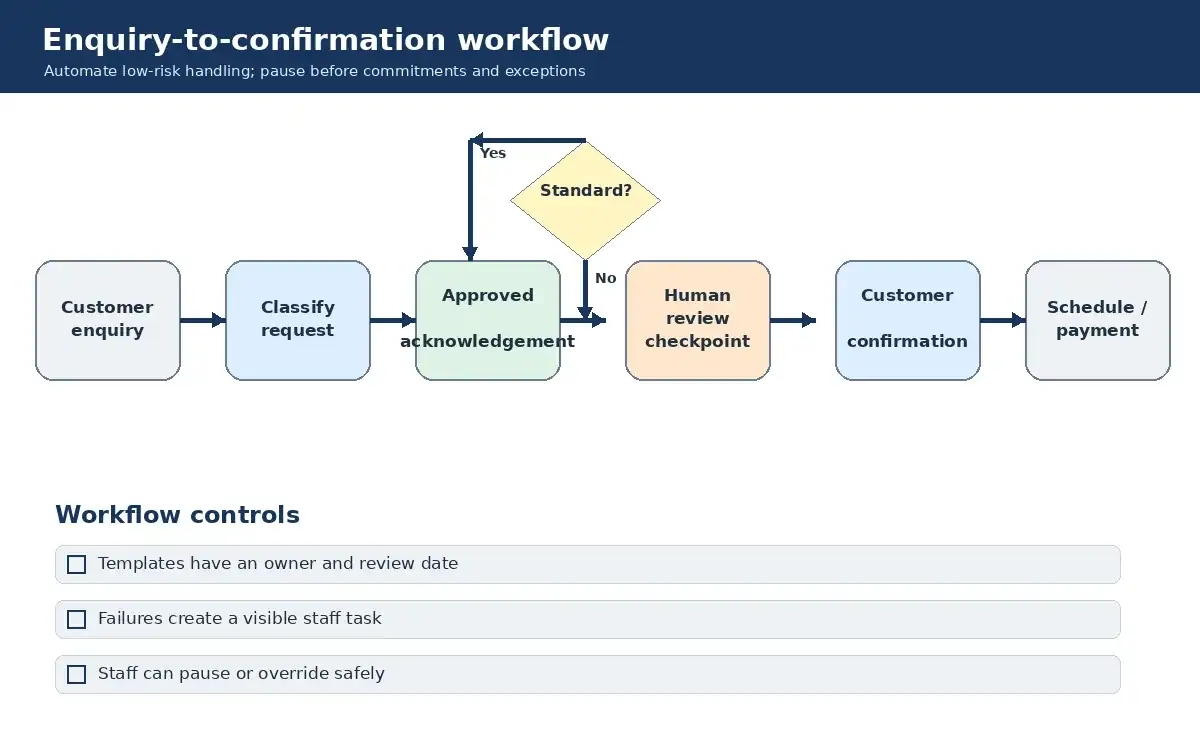
A typical process may include:
- Enquiry capture: a customer contacts the business through email, WhatsApp, a web form or another approved channel.
- Classification: the request is checked against defined categories, required information and routing rules.
- Response or quote preparation: an approved template or price source may be used where the request fits standard conditions.
- Customer confirmation: the response is recorded and the relevant order or case is updated.
- Scheduling and payment handling: the next action follows the business’s availability, payment and exception policies.
Whether any step is suitable for automation depends on the clarity of the rules, the quality of the incoming data, the reliability of integrations and the business’s approval policy. A standard acknowledgement may be low risk, while a quote or delivery commitment can create financial and operational obligations.
Use Approved Rules for Low-Risk Standard Actions
Good candidates for controlled automation may include:
- Capturing enquiries: copy messages or form submissions into a shared queue with the source, time and customer details recorded.
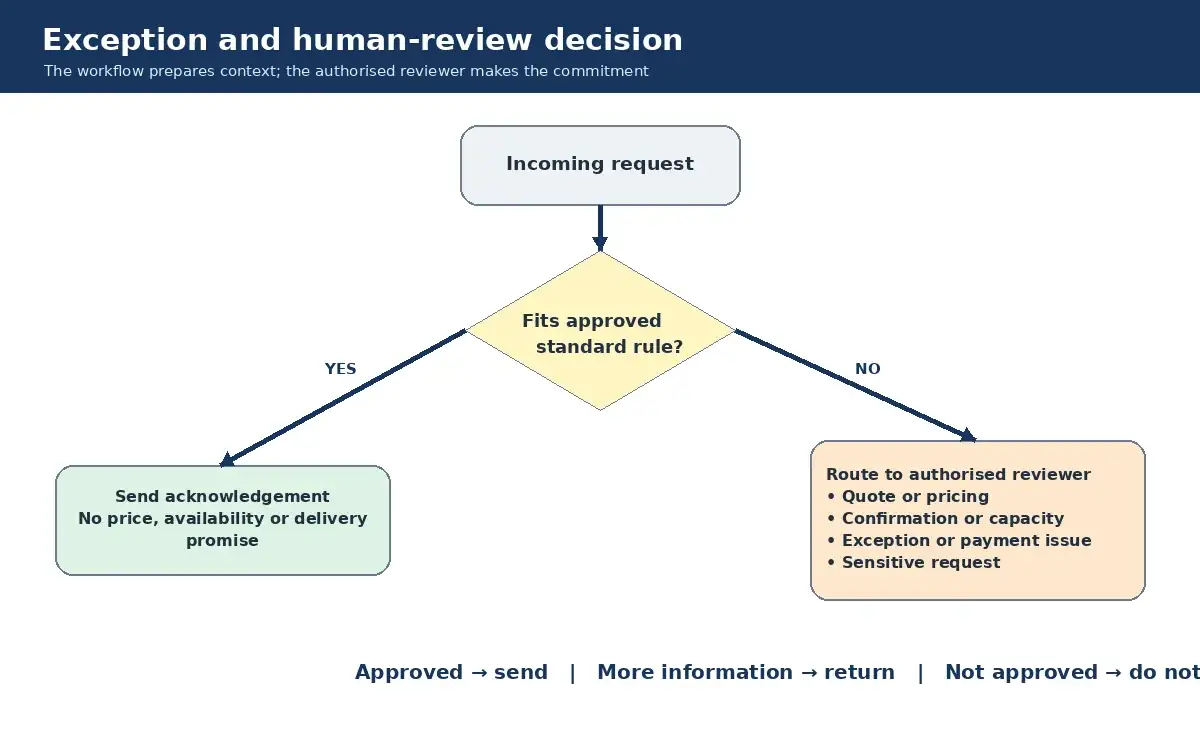
- Sending acknowledgements: confirm receipt using an approved template that does not promise price, availability or delivery.
- Requesting missing information: ask for defined fields such as preferred date, service location or order reference.
- Internal routing: assign a standard enquiry to the responsible team based on documented rules.
- Status notifications: notify staff when a record needs review or when an integration fails.
Approved templates and rules should have an owner, a review date and a simple way for staff to pause the workflow. Logs should show what the system received, which rule ran and what was sent.
Require Review for Commitments and Exceptions
Human review should be explicit where an action can create a commitment or where the automation lacks enough context. Depending on policy, this can include:
- Quotes and pricing: especially custom requests, discounts, variable delivery charges or information drawn from more than one system.
- Order confirmation: when capacity, stock, staffing, eligibility or scheduling must be checked.
- Exceptions: unusual requests, unavailable time slots, changes after confirmation or requests outside the standard offering.
- Payment issues: failed payments, refunds, disputes and mismatched records.
- Sensitive requests: messages involving personal, confidential or security-related information that require controlled handling.
The workflow can prepare the relevant information for a reviewer, but it should wait for the required approval before sending a quote, confirmation or other commitment. This removes the contradiction between fast standard responses and human oversight: routine acknowledgements can be immediate under approved rules, while commitments and exceptions stop at a defined checkpoint.
Low-Code Still Needs Technical Ownership
Tools such as n8n, Zapier and Microsoft Power Automate can reduce the amount of custom development needed to connect systems. They do not remove the need for suitable technical ownership. Someone still needs to manage authentication, permissions, data handling, integrations, error paths, testing, monitoring and maintenance.
Before selecting a tool, check whether the required channels have supported integrations or APIs, where workflow data will be stored, how access will be controlled and what happens when a connection fails. For example, an integration with WhatsApp requires the approved business platform and its applicable setup; it is not the same as connecting a personal chat account.
Build and Test One Controlled Step at a Time
Step 1: Document the current process. Record who receives each type of enquiry, which information is required and who can approve a quote or commitment.
Step 2: Select a bounded use case. Choose a step with clear inputs, low consequence if delayed and a straightforward manual fallback. Do not assume enquiry capture is the right first step for every business; confirm that the relevant channel and data can be integrated reliably.
Step 3: Define rules and exceptions. Write the conditions for an automated acknowledgement, the triggers for human review and the actions the workflow must never take on its own.
Step 4: Test safely. Use test records and representative scenarios before handling live customer enquiries. Cover missing data, duplicate submissions, unavailable services, integration failures and attempts to bypass the normal path.
Step 5: Monitor and maintain. Assign an owner to review logs, failed runs, templates, permissions and integrations. Update the workflow when business policy or connected systems change.
A Practical Control Model
- Standard acknowledgements may be sent automatically from approved templates.
- Rules determine when a request is routed to a person.
- Quotes, commitments and exceptions wait for the review required by business policy.
- Staff can pause or override the workflow through a documented process.
- Failures create a visible alert and a manual follow-up task.
Sakal Network provides n8n automation services for businesses that need help designing, integrating and maintaining controlled workflows. To discuss an existing enquiry process and the systems it uses, contact the Sakal Network team.